When Your Crafting Needs a Command Center: The Craft Planner KDP Interior
Every crafter knows the feeling. It starts with a single project—maybe a batch of holiday cards or a custom birthday gift for a friend. But somewhere between the yarn, the vinyl sheets, and the resin molds, the hobby starts to spill over. Suddenly, you’re buying supplies you already own, forgetting brilliant ideas you had at 2 AM, and wondering exactly where your monthly crafting budget disappeared to.
If this sounds familiar, you might not need more storage bins. You might need a flexible, practical system that organizes the chaos before it hits your workspace. That’s exactly where a purpose-built tool like a Craft Planner KDP Interior steps in. It’s not just a set of pretty pages. It’s a fully customizable framework designed to support the way you actually create.
What Makes a KDP Interior Different From a Store-Bought Planner?
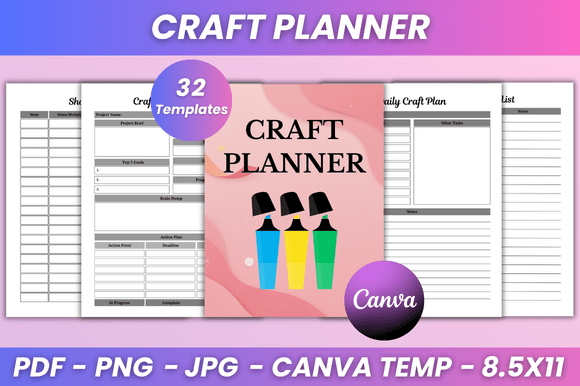
A Craft Planner KDP Interior is a pre-designed template package—typically 32 pages in this case—that covers the full lifecycle of a crafting project. You get everything from a daily craft plan to a yearly overview, along with trackers for budgets, supplies, and gift ideas. But the real distinction here is the Editable Canva Link. You aren’t locked into someone else’s layout aesthetics. You can change fonts, tweak colors, adjust the layout style, and even insert your own photos. It’s a skeleton you get to flesh out for your specific creative life. And because it comes as a High-Quality Print Ready 8.5 x 11 Inches PDF, plus JPG and PNG files, you aren’t limited to one format either.
Real People, Real Craft Rooms: Who Actually Uses This?
The beauty of a fully editable template is that it serves wildly different people in equally valid ways. Let’s walk through a few scenarios.
The Multi-Hobby Juggler
Most crafters don’t do just one thing. You might sew a costume in October, knit scarves in November, and build a birdhouse in December. Each hobby has its own rhythm, materials, and deadlines. The Daily Craft Plan and Week at a Glance pages let you allocate time realistically without overcommitting. You can see at a glance that this week is for resin casting, and next week is for watercolor. The Supplies Inventory becomes your best friend here, because you can note exactly which glue works for paper versus fabric, preventing those frustrating mid-project store runs.
The Etsy Seller or Market Vendor
When your hobby pays for itself, the game changes. You need to think about material costs, profit margins, and order deadlines. This is where the Budget Planner and Expense Tracker pages shine. You can log your raw material purchases, track how much you spent at the craft fair booth rental, and compare it against your sales. The Monthly Orders and Online Purchase logs are particularly helpful for separating business expenses from personal browsing. Instead of guessing whether that batch of soy wax was profitable, you have the hard numbers right there in your Craft Planner KDP Interior.
The Gift-Giver Who Plans Ahead
There is nothing better than a handmade gift. Unless you forget to make it. The Gift Project Tracker is perfect for noting down birthdays, anniversaries, and specific ideas months in advance. You can include sizes, preferred colors, and even a deadline for when the project needs to ship. The Craft Project Bucket List becomes a fun, aspirational space where you collect ideas for the future. It transforms random inspiration into a tangible plan.
The Digital Planning Enthusiast
You don’t have to print everything. Many users take the included PNG and JPG files and import them into apps like Goodnotes or Notability on their iPad. The Editable Canva Link lets you strip out pages you don’t need or duplicate ones you love. You can change the background color to something easier on the eyes, or adjust the font size so it’s readable on a smaller screen. The No Bleed specification means the design is clean and contained, which looks fantastic on a digital canvas.
Beyond the Basics: Features That Solve Real Problems
When you look at the feature list, certain pages stand out because they address very common pain points that crafters talk about online every day.
- Ideas and Inspiration pages: These aren’t just blank slates. They are a designated space to dump screenshots, magazine clippings, or half-formed thoughts. Having a dedicated place for this keeps the rest of your planner clean and focused.
- Weekly To-Do List and Weekly Plan: These provide a rhythm for your week. You can schedule crafting around work and family commitments without feeling like you’re losing time.
- Craft Supply Wish List: This is a sneaky helpful page. Instead of impulse buying every new tool that comes out, you can jot it down here. It helps you prioritize purchases and avoid clutter.
- Important Notes and Notes (2 pages): Sometimes you just need to free-write. Maybe it is a reflection on a failed project or a detailed sketch for a future one. The extra pages give you breathing room without forcing you to make up a category.
The Belongs To page and the Thank You page might seem small, but they add a layer of ownership and gratitude that makes the planner feel less like a corporate tool and more like a personal companion.
The Canva Factor: Why Customization Matters
One of the biggest frustrations with static planners is the little things. Maybe the lines are too close together, or the font feels too formal for your whimsical crafting style. Because this interior comes with an Editable Canva Link, you have control over the fundamentals. You can change the color scheme to match your brand or your mood. You can adjust the layout style to be more minimal or more decorative. If the Project Planner layout feels cramped, you can duplicate it in Canva and stretch the boxes. If the Shopping List needs more rows for a upcoming trip to the craft store, you can add them with a few clicks. This flexibility makes the planner a living document that adapts to your current project load.
Printing, Formatting, and Practical Considerations
Let’s talk about the real-world logistics. The 8.5 x 11 inches size is standard letter paper, which means almost any home printer can handle it. The No Bleed specification is intentional—it means the design elements stay within the safe printable area, so you don’t lose content to the margins. This is a huge relief if you’ve ever tried to print a full-bleed book at home and ended up with cut-off headers.
You also get Lifetime access to the files. This is practical because your needs change. This year, you might print the Yearly Plan and Monthly Planner. Next year, you might focus heavily on the Gift Project Tracker and Expense Tracker. You can print or digitally use the pages that matter, when they matter, without buying a whole new planner.
That said, it is worth noting that editing in Canva does require a free account. While the free tier is robust, a Canva Pro subscription unlocks some premium fonts and graphics if you want to go all out. But for 90% of users, the free version gives you more than enough control over the fonts, sizes, colors, and layout style to make this planner your own.
Matching the Planner to Your Workflow
Not everyone needs every page. A busy parent might live in the Daily Craft Plan and Weekly To-Do List. A retiree who spends hours on their hobbies might enjoy the Craft Project Plan and Craft Project Bucket List. A small business owner will lean heavily on the Budget Planner and Supplies Inventory. The strength of this system is that you don’t have to use it all. You pick the tools that fit your current season of life.
The Project Calendar and Project To-Do List work well together for complex builds that have multiple steps. You can map out when to order supplies, when to start, and when to finish. The Craft Plan pages allow for a high-level strategy of what you want to accomplish in a given month or season.
Building a Habit, Not Just a Collection of Pages
Having a Craft Planner KDP Interior is one thing. Using it consistently is where the magic happens. The structure is designed to encourage small, regular check-ins. The Week at a Glance pairs nicely with the Weekly To-Do List. The Monthly Planner gives you a birds-eye view of upcoming deadlines and events. Over time, the act of planning becomes part of the creative ritual, not a chore separate from it. You stop losing track of ideas, you stop buying duplicates, and you start finishing projects with more satisfaction because you saw them through from concept to completion.
The clean and minimal design helps here. It doesn’t distract. You aren’t overwhelmed by heavy graphics or cluttered layouts. The design gives your ideas room to breathe. Whether you are using the JPG Files for digital planning or printing the High-Quality Ready PDF, the experience remains clean and focused on what matters: your craft.
Ultimately, a planner is just paper (or pixels) until you use it. The beauty of this Craft Planner KDP Interior is that it doesn’t demand you change your workflow. It adapts to it. Whether you are sketching out a Weekly To-Do List on Sunday evening or mapping your entire Yearly Plan for a growing small business, having a structure that you can actually edit makes all the difference. It turns planning from a chore into a genuine part of the creative process.