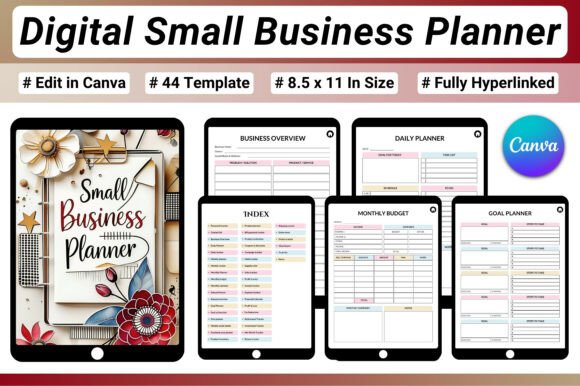
Digital Small Business Planner: Organize Your Entire Business in One PDF
Running a small business means juggling daily tasks, finances, marketing, products, orders, and long-term goals all at once. Without a reliable system, it is easy to feel overwhelmed or lose track of progress. A Digital Small Business Planner offers a structured yet flexible way to manage every aspect of your business from a single interactive document. This 44-page fully hyperlinked PDF gives entrepreneurs a clear overview of operations while allowing deep dives into specific areas like budgeting, inventory, social media planning, and goal tracking.
Designed for use on iPads, tablets, or desktops, this planner works seamlessly with apps like GoodNotes and Notability. The hyperlinked structure means you can jump directly to the section you need without endless scrolling. Whether you run an Etsy shop, a Shopify store, a freelance business, or a content creation brand, this digital planner helps you stay consistent, informed, and ready to grow.
What Makes a Fully Hyperlinked Business Planner Different
A paper planner can feel limiting when your business moves fast. A static PDF helps, but flipping through pages wastes time. The Digital Small Business Planner 44 Pages Fully Hyperlinked PDF solves this by connecting every section with clickable links. You move from your weekly planner to your income tracker, then to your goal action plan, all in seconds. This design encourages regular use because accessing the right tool never feels like a chore.
Another advantage is the ability to duplicate pages, reset trackers monthly, and keep everything digital. No printing, no rewriting, no clutter. For entrepreneurs who value efficiency, this format makes staying organized feel natural rather than forced.
Core Sections That Cover Every Business Area
The planner includes 44 pages organized into clear categories. Each category addresses a critical part of running a business.
Business Planning and Productivity
Daily, weekly, monthly, and annual overview pages help you map out your schedule and priorities. The goal planner and action plan section lets you break larger ambitions into manageable steps. A habit tracker keeps you accountable for the small actions that build momentum over time. To-do list and notes pages give you space to capture ideas as they come.
Using these pages together creates a rhythm. You start your week by reviewing the annual overview, then set monthly priorities, then plan your daily tasks. This layered approach ensures short-term actions always serve long-term goals.
Finance and Budget Management
Financial clarity is essential for any small business. The planner includes a monthly budget planner, annual finance tracker, income tracker, expense tracker, profit tracker, and a profit and loss tracker. A financial calendar helps you remember tax deadlines, invoice dates, and recurring payments.
These tools give you a real-time picture of your cash flow. Instead of guessing whether you are profitable, you see exactly where money comes from and where it goes. For freelancers and online sellers, this level of detail helps with pricing decisions and seasonal planning.
Social Media and Marketing Planning
Marketing pages let you plan content calendars, track platform performance, and schedule promotions. You can log post ideas, record engagement metrics, and note which strategies drive sales. This section is especially useful for content creators and Etsy sellers who rely on consistent online visibility.
Using the marketing pages alongside the financial trackers helps you measure return on investment. You can see which channels actually generate income and adjust your efforts accordingly.
Sales, Orders, and Inventory Tracking
For product-based businesses, managing orders and inventory can become chaotic without a system. This planner includes dedicated pages for recording sales, tracking orders, and monitoring stock levels. You can note which products sell best, when to reorder supplies, and how much inventory sits in each stage of fulfillment.
This section eliminates guesswork. When you review your inventory tracker weekly, you avoid stockouts and overordering. Pairing it with the profit tracker shows you which products contribute most to your bottom line.
Creative Ways to Adapt the Planner for Your Business
Every entrepreneur works differently. The Digital Small Business Planner is designed to be adapted, not followed rigidly. Here are practical ways different users can tailor it to their needs.
For Etsy Sellers and Shopify Store Owners
Use the inventory pages to track each product variant and material. Combine the order tracker with the profit and loss page to see which listings perform best. The marketing calendar helps you plan seasonal promotions and coordinate with holidays. If you sell across multiple platforms, create separate sections for each store by duplicating the relevant pages within the PDF.
A helpful practice is to review your inventory and sales data every Sunday evening. That half-hour gives you a clear picture of what sold, what needs restocking, and which listings need updated photos or descriptions.
For Freelancers and Service Providers
Freelancers often juggle multiple clients, projects, and deadlines. The daily and weekly planners become your project timeline. Use the income tracker to log each payment and the expense tracker to record software subscriptions, travel costs, or contractor payments. The goal planner works well for setting monthly income targets or skill development milestones.
If you offer packages or retainers, the financial calendar helps you schedule invoices and follow-ups. You can also use the notes pages to capture client feedback or ideas for new services.
For Content Creators and Bloggers
Content creation requires consistent output across blog posts, videos, social media, and newsletters. The marketing pages are your editorial calendar. The daily planner helps you block time for writing, filming, editing, and promotion. Use the habit tracker to maintain a posting schedule without burning out.
The finance sections are valuable for tracking affiliate income, sponsored post payments, and ad revenue. When you see which content types generate the most income, you can focus your energy where it matters most.
For Small Teams and Co-Founders
Even if you work with a small team, this planner can serve as a central reference. Share the PDF via cloud storage and assign team members to update specific sections. The annual overview and goal action plan become your shared roadmap. Team members can use the notes pages to log ideas or flag issues before weekly check-ins.
This approach keeps everyone aligned without requiring expensive project management software. It also gives you a single source of truth for financial and operational data.
How to Keep Your Digital Planner Clear and Effective
A planner only works if you use it regularly and keep it organized. Here are practical strategies to get the most out of your Digital Small Business Planner 44 Pages Fully Hyperlinked PDF.
Set a Weekly Review Routine
Choose a consistent time each week to update your planner. Many entrepreneurs prefer Sunday evening or Monday morning. During this session, review the past week's income and expenses, check inventory levels, update your to-do list, and adjust the weekly planner. This habit prevents data from piling up and keeps your planner accurate.
Use Hyperlinks to Navigate Quickly
The hyperlinked structure is one of the planner's biggest strengths. Create a habit of clicking through sections instead of scrolling. For example, when you finish a daily task, click to the goal planner to check your progress. When you log a sale, click to the profit tracker to see updated totals. This fluid movement makes the planner feel like an interactive dashboard.
Duplicate Pages for Ongoing Needs
If you use a monthly budget tracker, duplicate the page at the start of each month and reset the numbers. Same for weekly planners and habit trackers. Keeping a clean, current version helps you avoid confusion. You can archive old pages in a separate folder or keep them within the PDF for year-end review.
Combine Analog and Digital Approaches
Even though the planner is digital, some people prefer handwriting notes with an Apple Pencil or stylus. Apps like GoodNotes and Notability support handwriting directly on the PDF. You can write to-do lists, annotate financial data, or sketch content ideas by hand while still using hyperlinks for navigation. This hybrid method combines the flexibility of handwriting with the speed of digital linking.
Why Consistency Matters More Than Perfection
Many entrepreneurs abandon planners because they feel pressure to fill every page perfectly. The Digital Small Business Planner is a tool, not a test. Use the pages that matter most to your business right now. Leave others blank if they are not relevant. Over time, you may find new sections become useful as your business evolves.
Consistency matters more than completeness. Ten minutes of updating each day is worth more than an hour of perfect formatting once a month. The planner is designed to support your workflow, not complicate it. When you treat it as a flexible companion, it becomes easier to maintain and more valuable over the long term.
Structuring Your Business for Growth
The ultimate goal of any business planner is to give you clarity. When you know your numbers, your schedule, your inventory, and your goals, you can make decisions with confidence. The Digital Small Business Planner 44 Pages Fully Hyperlinked PDF Business, Finance Social Media Planner Sales, Orders, Inventory Goal Tracking US Letter 8.5×11 in provides a complete system for doing exactly that.
Whether you are starting a side hustle or scaling an established brand, having a single organized document changes how you work. You stop relying on memory or scattered notes. You start seeing patterns, identifying opportunities, and adjusting your approach based on real data.
Investing time in setting up your planner and using it consistently pays off in reduced stress and better business decisions. The structure is there. The hyperlinks make it fast. Now it is up to you to fill the pages with the work that moves your business forward.