Your Vision Board Journal: Customize and Create
A vision board journal helps you clarify what you want and track progress toward it. The Vision Board Journal Canva KDP Graphic is a fully editable template that lets you tailor every page to your preferences. Instead of starting from scratch or using a rigid pre-designed notebook, you adjust fonts, colors, and layouts until the journal feels right for your goals. This is not about following someone else’s system—it is about building a tool that matches how you think, plan, and reflect.
Different people approach this template with different priorities. A small business owner may care most about speed and commercial value. A beginner might wonder if the template is easy to learn. A creator or educator could focus on flexibility and presentation. Each perspective is valid, and the same product can serve very different needs depending on how you use it.
What the Vision Board Journal Canva KDP Graphic Offers
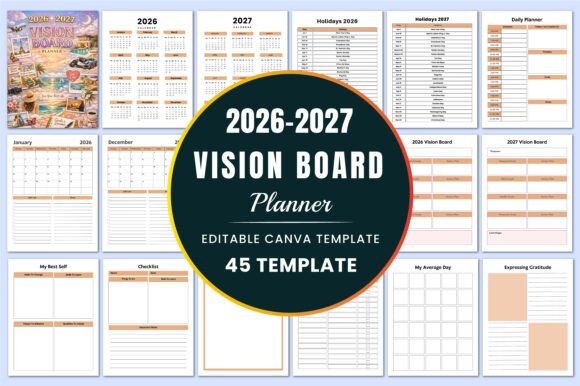
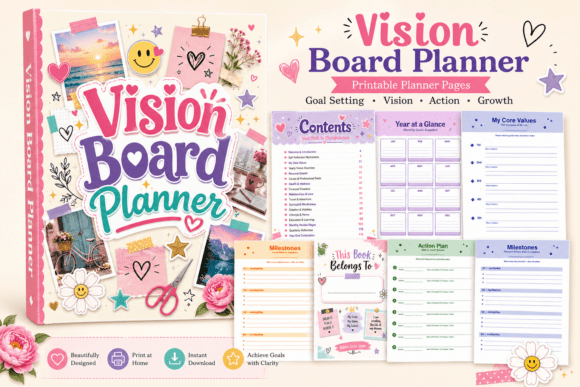
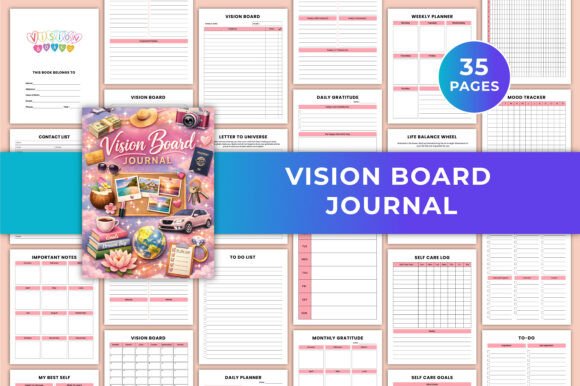
This template includes 35 pages in US Letter size (8.5 × 11 inches), provided as a printable PDF along with high-quality JPG and PNG files. It uses CMYK color and has no bleed, which makes it suitable for both digital use and print-on-demand services like Amazon KDP. Because it is fully editable in Canva, you can modify any element—headings, background colors, images, font styles, and layout structure.
The pages cover vision boards for career, finance, health, relationships, and life goals. There are also daily planners, daily journal pages, to-do lists, gratitude journal sections for daily, weekly, and monthly use, mood and sleep trackers, a self-care log and goals page, a life balance wheel, a letter to the universe manifestation exercise, goal setting and checklist pages, habit trackers, weekly and monthly layouts, and space for notes, ideas, and sketches. Altogether, it functions as both a planning system and a reflective journal.
How Beginners and New Users Can Approach It
If you are new to goal setting or journaling, a blank notebook can feel overwhelming. The Vision Board Journal Canva KDP Graphic gives you structure without locking you into a rigid format. You can start by using the journal exactly as designed—print the pages and fill them out with pen or digitally in Canva. As you become more comfortable, you can begin adjusting the template to better suit your habits.
For example, you might find that the daily gratitude section works well but the mood tracker feels unnecessary for your current routine. You can delete the mood tracker page and duplicate the gratitude section instead. You can also change the font to something more readable, or swap out the color palette to match what feels calming to you. This level of flexibility is helpful when you are still figuring out what kind of journaling practice works best.
A beginner may also appreciate that the template is sold as a one-time resource rather than a subscription. You pay once, edit as much as you want, and print as many copies as you need. This makes it easy to experiment without financial pressure.
For Creators, Publishers, and Small Business Owners
If you sell digital products or physical planners on platforms like Amazon KDP, Etsy, or Gumroad, the Vision Board Journal Canva KDP Graphic offers commercial value. Because it arrives as an editable Canva template, you can rebrand it with your own logo, adjust the content to fit your audience, and publish it as your own product. The CMYK color profile and no-bleed format are standard requirements for print-on-demand, reducing the need for extra prep work.
Practical use cases include creating multiple variations of the same journal. You could produce a version focused on career goals, another on health and wellness, and a third on creative projects. Each variation would retain the core structure but swap out page titles, imagery, and color schemes. This approach saves time while still offering variety to your customers.
Speed matters in this context. Because the template is fully editable, you can customize a new version in hours rather than days. You also avoid the cost of hiring a designer for every new product. Over time, this makes the template a repeatable asset—you can reuse it as a base for seasonal editions, themed journals, or collaborations.
What Professionals and Educators Look For
Professionals such as coaches, therapists, or workshop facilitators may use this journal as a resource for clients or students. The life balance wheel, gratitude pages, and goal setting sheets provide concrete exercises that can be integrated into coaching sessions or class activities. Because you can edit the content, you can add prompts or instructions relevant to your field.
For example, a career coach might modify the vision board pages to include sections for professional skills, networking goals, and income targets. An educator teaching personal development could remove the manifestation pages if they want to focus only on measurable goal setting. The flexibility ensures the journal aligns with your professional approach rather than forcing you to adapt to a pre-existing design.
Educators and trainers may also value the printable nature of the template. You can print sections individually and distribute them during workshops or classes. You do not need to hand out the full 35 pages at once. This modularity lets you control how much content participants receive at each stage.
For Hobbyists and Personal Growth Enthusiasts
If journaling is a personal practice rather than a commercial project, your priorities likely center on creativity, ease of use, and long-term usefulness. The Vision Board Journal Canva KDP Graphic supports these needs because you can evolve the journal over time. You might start with the default layout and gradually adjust it as your goals shift.
You could, for instance, redesign the mood tracker into a weekly reflection page if that feels more relevant. The letter to the universe page can be rewritten or reimagined as a yearly intention letter. The habit tracker can be simplified to track only three habits instead of ten. The template becomes more useful the more you tailor it to your actual routines.
Another advantage is that you can print fresh copies whenever you want. If you fill a journal and want to start a new one, you simply print another set. You are not dependent on a store restocking a specific design. This makes it a reliable long-term tool for anyone who values consistency in their practice.
Evaluating Quality, Flexibility, and Cost
When deciding whether the Vision Board Journal Canva KDP Graphic matches your needs, consider what matters most to you.
Ease of use: If you have used Canva before, you will find the template straightforward. If you are new to Canva, basic tutorials cover the skills needed to edit text, colors, and images. The learning investment is small compared to the customization you gain.
Quality: The files are provided in high-resolution formats suitable for both digital and print use. CMYK color ensures print accuracy. The lack of bleed simplifies printing for standard home printers or commercial services.
Flexibility: You are not limited to the original design. You can add pages, remove sections, change the order, or completely rebrand the journal. This makes it suitable for both personal use and product creation.
Cost: A single purchase gives you editable files and the ability to produce unlimited copies. For commercial users, this eliminates the need to pay per unit. For personal users, it replaces the cost of buying multiple pre-designed journals over time.
Long-term usefulness: Because you can update the template as your preferences change, the same file can serve you for years. You are not locked into a static design that becomes irrelevant.
Matching the Product to Your Goals
Identifying whether this template fits your project or practice requires honest reflection about your skill level and needs.
- If you want a ready-to-use journal and have no interest in design, the default layout works well as a printable. You can use it immediately without changes.
- If you plan to sell journals, the editability lets you create unique products without designing from scratch.
- If you run workshops or coaching sessions, the modular pages give you content you can adapt for different groups.
- If you are building a personal journaling habit, the variety of pages helps you explore different techniques without committing to one approach.
The template is also useful if you dislike rigid formats. Because you control the layout, you can discard sections that do not serve you and expand the ones that do. This is harder to achieve with a printed journal or a non-editable PDF.
Practical Example: A Freelancer Using the Template
Consider a freelance graphic designer who wants to improve work-life balance and track client projects. They could use the vision board pages to map out income goals and ideal project types. The daily planner helps schedule client work and personal time. The gratitude journal might focus on appreciating steady work, while the self-care log reminds them to take breaks between deadlines. The life balance wheel would highlight where work dominates and where relationships or health need attention. Over time, they can adjust the template to include a project tracking page or a recurring task list specific to their freelance workflow.
This example shows how the same core design adapts to a specific routine without requiring the user to build a system from nothing.
Another Perspective: A Small Publisher Creating Niche Journals
A small publisher targeting wellness audiences could use the Vision Board Journal Canva KDP Graphic as a base for multiple products. They might create a version with pastel colors and soft imagery for a self-care journal, then a bold version with strong typography for a goal-setting planner aimed at entrepreneurs. By changing the cover, adjusting the interior colors, and tweaking the page order, they produce distinct products from a single template. This reduces production time and allows faster testing of different niches.
Final Considerations
The Vision Board Journal Canva KDP Graphic works best when you treat it as a starting point rather than a finished product. The value comes from the edits you make, the pages you prioritize, and the way you integrate the journal into your routine or business. Whether you are a beginner learning to articulate goals, a creator building a product line, or a professional facilitating growth in others, the template offers a flexible foundation that you can shape to your exact requirements.
Take time to explore the 35 pages, identify which ones align with your current priorities, and experiment with changes that make the journal feel like yours. The effort you invest in customization pays back in relevance and long-term use.