2026–2027 Office Productivity Planner: A Practical Tool for Professional Organization
Staying organized across two work years is a challenge that many professionals face, especially when managing multiple projects, deadlines, and team responsibilities. The 2026–2027 Office Productivity Planner offers a structured approach to tracking daily tasks, weekly objectives, monthly goals, and longer-term professional development. Rather than a simple datebook, this planner integrates logs for hours worked, overtime, team leave, expenses, and client projects, making it a comprehensive resource for individuals and small teams alike. Understanding what this planner includes, how it compares to other formats, and where it fits best can help you decide whether it meets your workflow needs.
What the 2026–2027 Office Productivity Planner Offers
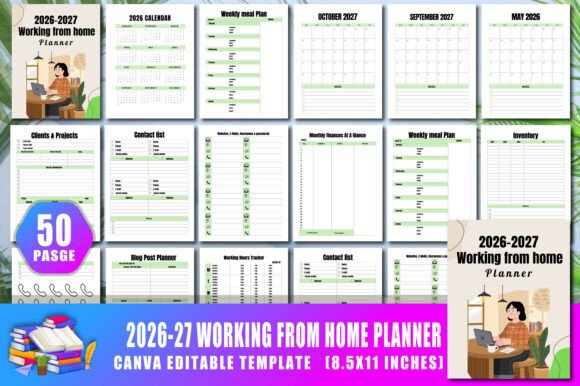
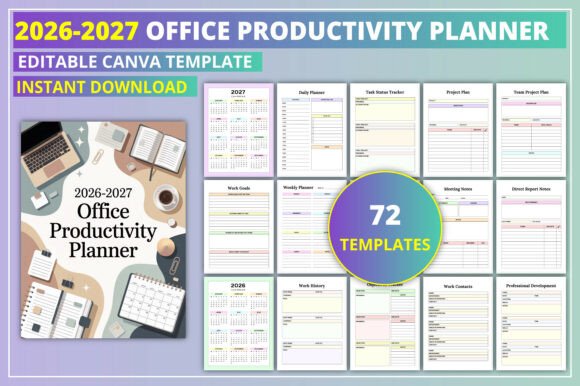
This planner is designed as a two-year professional organizer that covers both 2026 and 2027. It includes dedicated pages for daily, weekly, and monthly planning, along with specialized sections for tracking work history, deadlines, priorities, task statuses, and project plans. The inclusion of meeting notes pages, a contacts directory, and a resources section makes it suitable for someone who needs a single hub for both planning and reference. The planner also features logs for overtime, team leave, annual leave, and work expenses, which can be particularly useful for freelancers, managers, or small business owners who need to keep administrative details in one place.
One distinct feature is the editable Canva template, which allows users to customize the layout, colors, fonts, and branding before printing or uploading. This makes the planner adaptable for personal use or for professionals who want to offer it as a branded resource to clients or team members. The availability in JPG, PNG, and PDF formats also supports both digital and print workflows, so you can use it with note-taking apps like GoodNotes or Notability, or print it for a paper-based system.
Comparing the Planner to Other Productivity Approaches
When evaluating the 2026–2027 Office Productivity Planner, it helps to consider how it compares with other common planning tools. Many professionals use digital calendar apps like Google Calendar or Outlook for scheduling, combined with task management tools like Trello, Asana, or Todoist. These digital tools offer real-time collaboration, automatic reminders, and integration with other software. However, they can also create fragmentation—appointments in one app, tasks in another, notes in a third—and some users find that a physical or printable planner provides a more focused, distraction-free view of the week.
Another common option is a bullet journal or a simple notebook, which gives complete flexibility in layout but requires the user to design their own spreads and trackers each week. That approach works well for people who enjoy the creative process and want total control, but it demands consistent time and effort. The 2026–2027 Office Productivity Planner sits somewhere in between: it offers pre-designed pages that save setup time while still allowing customization through the Canva link. For someone who wants structure without rigidity, this hybrid model can be appealing.
There are also many ready-made planners available in bookstores or online marketplaces, ranging from simple datebooks to elaborate systems like the Full Focus Planner or the Panda Planner. These often come with printed covers and binding, and they may include motivational content or coaching prompts. The 2026–2027 Office Productivity Planner is a digital download that you print or use digitally, which means you control the paper quality, binding method, and whether you use it on a device. This flexibility can be a tradeoff: you save money on a pre-bound book but spend time on setup and printing.
Strengths and Practical Benefits
One of the main strengths of this planner is its breadth of included pages. The combination of daily, weekly, and monthly views, plus logs for hours worked, overtime, leave, and expenses, means you can manage multiple aspects of work life without switching between tools. The team task list and team leave tracker are particularly useful for managers who oversee a small group and want a quick reference for who is available and what each person is working on. The project plan and client project log also support a service-oriented workflow, which is common in consulting, creative agencies, or freelance work.
The editable Canva template adds significant value for professionals who want a consistent brand experience. If you are a productivity coach, a small business owner, or someone who provides planners to clients, you can customize the colors, add your logo, and adjust the layout to match your needs. This is more difficult to do with a pre-printed planner, where you are limited to the design chosen by the publisher. The digital format also makes it easy to reprint pages as needed, which is helpful if you make mistakes or want to adjust your approach mid-year.
Another practical benefit is the two-year scope. For someone who prefers to plan ahead or who manages projects that span more than one calendar year, having both 2026 and 2027 in a single document reduces the need to transition between different planners. It also allows you to carry over unfinished goals and deadlines naturally, without losing context.
Limitations and Situations Where Alternatives May Work Better
Despite its comprehensive structure, the 2026–2027 Office Productivity Planner may not suit every work style. The pre-defined pages assume a certain workflow—daily task lists, weekly planning, and monthly reviews—which may feel restrictive to someone who prefers a more unstructured approach or who needs different tracking categories. For example, if your work involves frequent client calls or a high volume of short-term tasks, you might find the daily and weekly pages adequate, but the project plan and client log may be more than you need.
Another limitation is the reliance on a digital file that requires printing or a compatible note-taking app. If you prefer a bound book that lies flat on your desk without assembly, a traditional printed planner may be more convenient. The time and cost of printing (especially in color if you customize the design) can add up, and not everyone has access to a reliable printer or the patience to organize loose pages into a binder or disc-bound system. Users who want a seamless, out-of-the-box experience may find a pre-bound planner more practical.
The team-oriented pages, such as the team leader tracker and team project plan, are useful only if you manage people. For individual contributors who work alone, these pages may go unused, and the space could feel wasted. In that case, a simpler planner focused on personal task management and goal tracking might be a better fit. Similarly, the expense log and overtime tracker are most relevant for freelancers, part-time workers, or employees who need to report billable hours. A salaried employee with a fixed schedule may not need these sections.
When This Planner Is the Right Choice
The 2026–2027 Office Productivity Planner is well-suited for professionals who want an all-in-one system for planning, tracking, and record-keeping, especially those who work with clients, manage a small team, or track billable time. If you are a freelancer, consultant, or small business owner, the combination of project logs, expense sheets, and leave trackers can help you stay on top of administrative details without juggling multiple apps. The editable Canva template also makes it easy to present a cohesive brand to clients or team members.
It is also a good option for people who prefer to customize their planning system but do not want to start from scratch. Rather than designing every page from a blank notebook, you get a robust set of templates that you can adjust to your preferences. This saves time while still giving you control over the final appearance. If you already use a digital note-taking app and enjoy handwriting notes or to-do lists, the PDF format integrates well with that workflow.
For managers, the team-focused pages provide a quick view of task assignments, leave schedules, and project statuses, which can support weekly check-ins or one-on-one meetings. Having this information in a single document reduces the need to cross-reference multiple tools, though it is worth noting that for larger teams or more complex project management, a dedicated software solution may still be necessary.
When Another Option May Be Preferable
If you prefer a fully digital system with automatic sync across devices, calendar integration, and real-time collaboration, a combination of digital tools will likely serve you better. The 2026–2027 Office Productivity Planner is primarily a static document, even when used digitally, so it does not offer reminders, notifications, or automatic data aggregation. It also does not support multi-user editing by default, though you can share the Canva template with team members if you choose.
For someone who values a minimalist, flexible system, a blank notebook or a simple weekly layout may provide the freedom to adapt your planning method over time without being constrained by pre-printed pages. Similarly, if you prefer a planner with more structured coaching prompts, goal-setting frameworks, or habit trackers, you may find that a dedicated goal-oriented planner better matches your needs.
The two-year scope, while beneficial for some, may feel unwieldy for others. If you prefer to reset your planning approach each year, or if your work context changes significantly between years, a single-year planner might be a simpler choice. Carrying unused pages from one year to the next can create clutter, both physically and mentally.
Factors to Consider Before Choosing
When deciding whether the 2026–2027 Office Productivity Planner fits your needs, consider the following:
- How do you prefer to plan—on paper, digitally, or a mix? The planner works in both formats, but the experience differs from a dedicated app.
- Do you manage a team or work independently? The team-oriented pages add value for managers but may go unused for solo professionals.
- How much time are you willing to invest in customization and setup? The editable template offers flexibility but requires some effort to personalize.
- Do you need to track billable hours, expenses, or leave? These dedicated logs are a core strength of this planner.
- Are you looking for a one-time purchase or an ongoing subscription? A digital download is a single cost, which some users prefer over monthly app fees.
These questions are not meant to steer you toward or away from this planner, but rather to help you clarify your own priorities. No single tool fits every situation, and understanding the tradeoffs is the most reliable way to choose a system you will actually use.
Making an Informed Decision
The 2026–2027 Office Productivity Planner offers a practical, comprehensive structure for managing work tasks, projects, and administrative details across two years. Its combination of daily, weekly, and monthly planning, along with specialized logs for overtime, expenses, team leave, and client work, makes it a solid choice for professionals who want a single resource rather than a collection of separate tools. The editable Canva template adds flexibility for branding or personalization, which is a notable advantage over many pre-printed planners.
At the same time, it is not a replacement for a fully connected digital ecosystem or a minimalist system for those who prefer simplicity. The best choice depends on how you work, whether you manage others, how much setup time you can invest, and whether you value a paper-based or digital workflow. By weighing these factors against the planner's strengths and limitations, you can decide if it aligns with your productivity habits for 2026 and 2027.